
Everything it does — and remembers.
Capture both sides of any call, transcribe and summarize on-device, track every commitment, name the voices, read the shared screen, and close the follow-up loop in your inbox — nothing ever leaves your machine.
Your meetings,
answerable.
Ask in plain words. Shruti searches every transcript by meaning — "pricing concerns" finds "40k feels high" — and answers with the exact meeting and minute it came from.
It reads the shared
screen, too.
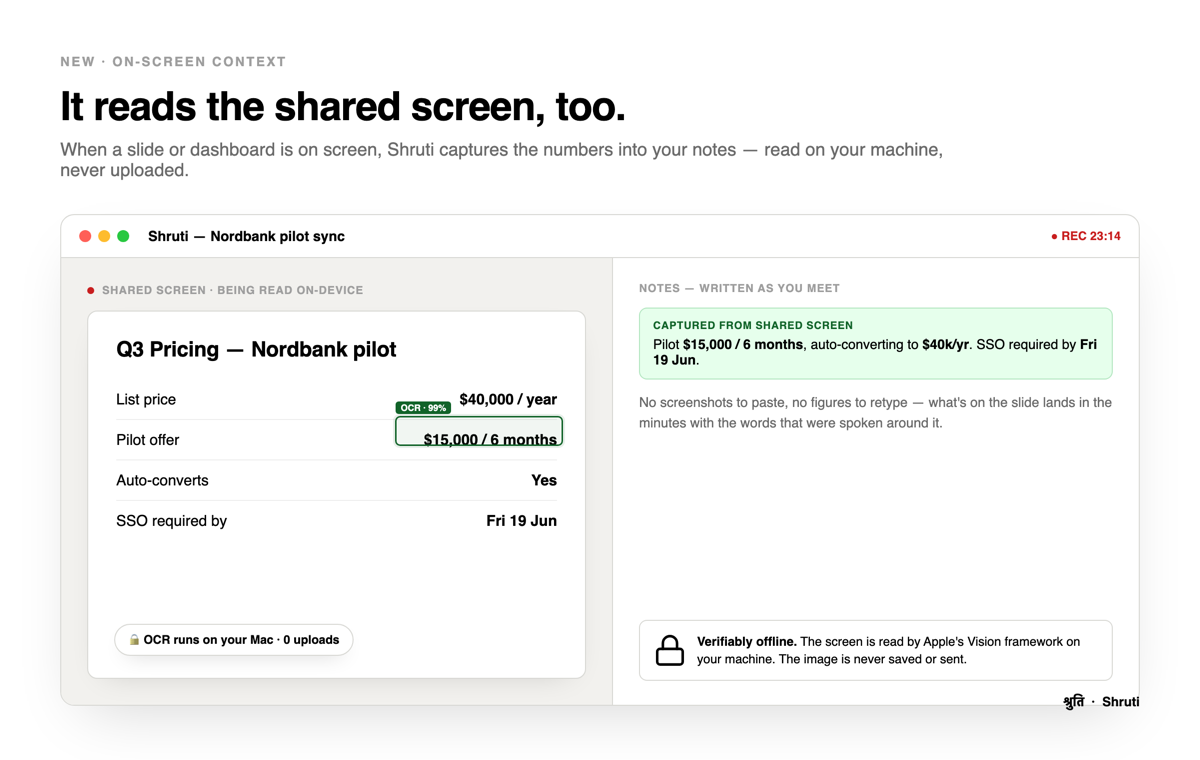
When a slide or dashboard is on screen, Shruti reads the figures with Apple's on-device Vision OCR and folds them straight into your notes — no screenshots to paste, nothing leaves your machine.
Everything else it does.
Ten more things Shruti handles quietly — every one of them on your machine.
Your follow-ups, tied to the meeting
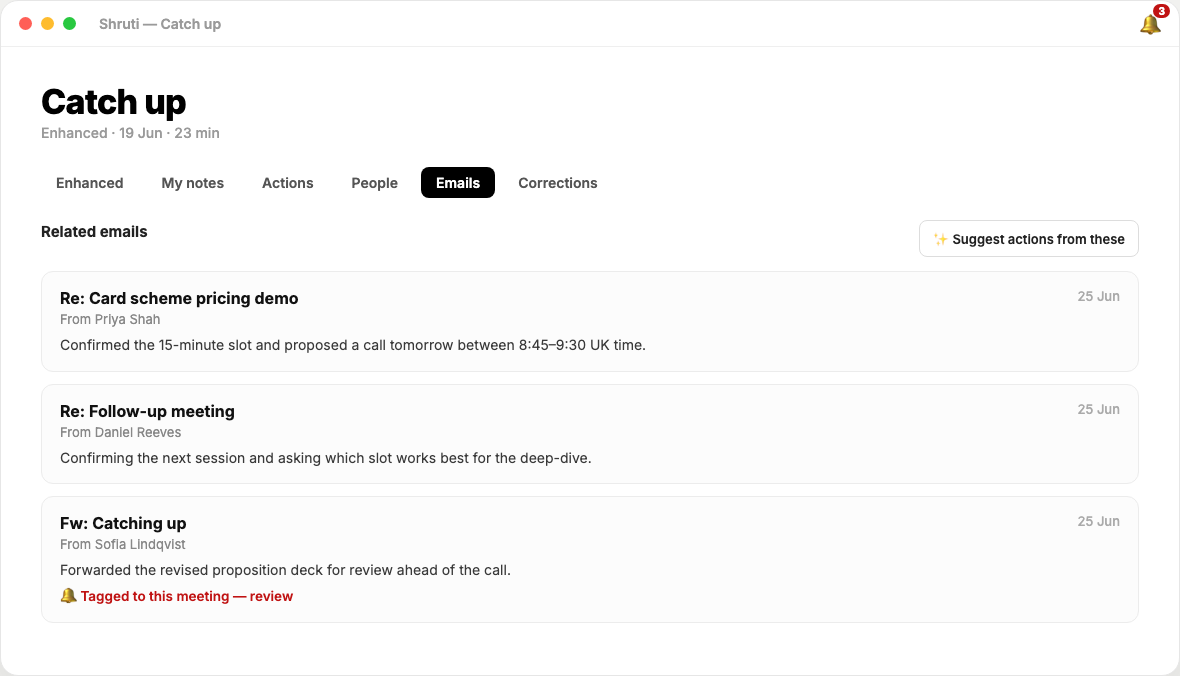
Opt in and Shruti reads your mailbox locally, links every reply to the meeting it belongs to, summarizes the thread, and tells you whether the follow-up you promised actually went out.
Commitments that refuse to be forgotten
Every "I'll send it by Friday" becomes a tracked item with an owner and a date. Open items resurface automatically the next time you meet the same people.
Walk in already caught up
Before a meeting starts, Shruti hands you one page: where you left off, what they owe you, what you owe them, what was left unresolved.
Hear it again, exactly
Click any line of any transcript and listen to that precise moment. "Did she say fifteen or fifty?" takes two seconds to settle.
Everyone you've met, remembered
A People view of every person you've spoken with: their meetings, their commitments, what's still open — built automatically, stored only on your machine.
It knows who's talking
Shruti recognizes voices it has heard before and names speakers in the transcript automatically. A new voice? Name it once — that's the last time you'll have to. Voiceprints never leave your machine, and every person has a one-click "Forget voice".
Recordings that survive anything
The audio is written to disk as it happens. If your machine dies mid-meeting, Shruti recovers the recording and the notes on next launch. Nothing is lost.
It taps you on the shoulder
When a call starts, Shruti notices and offers to record — one click. Meetings get named from your calendar automatically.
It learns how you talk
Odd names and jargon get flagged right in the transcript. One click teaches Shruti forever — and a Corrections view lists every guess (what we heard → what we think it is) so you can confirm them in one sweep, or flip a wrong one later.
Yours to keep, or not
Keep recordings forever, delete them after the notes are written, or sweep anything older than 30 days. Transcripts and notes always stay. Your data, your policy.
Opens to your week, not a blank page.
Shruti's home screen is a dashboard of facts: hours in meetings this week, what you owe and what's owed to you — one click jumps into the meeting it came from — and the people you actually spend time with. Because Shruti hears both sides of the call separately, it even knows your real speaking share. And the meetings that produced nothing? Counted, honestly.
The follow-up loop, finally closed.
The call ends and the work moves to your inbox. Shruti reads your mailbox — right here on your computer — and ties every reply back to the meeting it came from. It summarizes the thread, shows who wrote what, and even drafts the action items for you to review. Promised to send something? Shruti knows whether it actually went out, and a quiet bell tells you what's waiting. Opt-in, and read where your mail already lives — nothing is ever fetched from us, nothing is ever sent to us.
Under the hood, with nothing hidden: the first time you switch this on, Shruti quietly downloads Thunderbird — the trusted, open-source mail app — and uses it to sync your mailbox to your computer. From then on Shruti reads only what's already on disk and summarizes it with the on-device AI. Your email never passes through a Shruti server, because there isn't one.
Try the whole thing, free.
14 days, every feature included, nothing uploaded.